

AWS Security Hub Network Scanning explained: config-based exposure vs. actual internet reachability
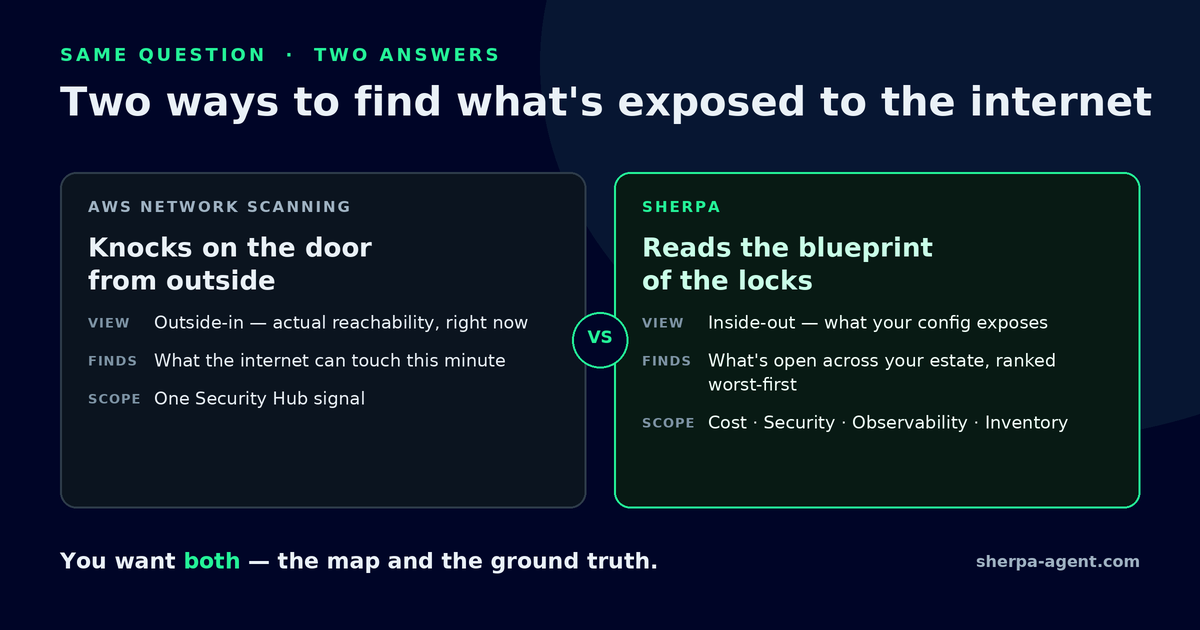
TL;DR: AWS Security Hub Network Scanning probes your resources from the internet to find what is genuinely reachable — public IP addresses, virtual machines, and load balancers, the ports open on them, and the services running behind those ports. It is different from the older approach of reading your security groups and route tables to infer what could be reachable. The two approaches answer two different questions — “what could be reached?” and “what is reachable right now?” — and mature cloud security uses both. Network Scanning is included with Security Hub Essentials at no additional cost, in every commercial Region that supports Security Hub.
What is AWS Security Hub Network Scanning?
Network Scanning is a capability in AWS Security Hub, announced on July 8, 2026, that identifies resources in your environment that are reachable from the public internet. Instead of reasoning about your configuration, it probes your resources from the outside — the same vantage point an attacker has — to detect actual reachability.
According to AWS, it discovers public IP addresses, virtual machines, and load balancers across AWS and Azure environments, identifies which ports are reachable, and determines what services are running behind them. Every reachable port becomes a Security Hub finding, complete with evidence of the port and the service discovered. Those findings then feed Security Hub Exposures, which correlates them with your other findings and resource configurations to size the broader risk.
How is this different from configuration analysis?
Most exposure tooling works on paper. It reads your security groups, route tables, and network ACLs and reasons forward: “this load balancer allows 0.0.0.0/0 on port 443, so it is reachable.” This is configuration analysis, and it is genuinely useful — it catches misconfigurations before they ship and explains why something is exposed.
But configuration and reality drift apart over time. Two failure modes are common:
- False comfort. A resource looks locked down in config, yet a forgotten peering connection, an upstream proxy, or a stale rule leaves a real path open. The paper map says “closed”; the internet says otherwise.
- False alarm. A resource looks wide open in config, but something upstream — a firewall, a disabled listener, a parked DNS record — means nothing can actually reach it.
Active probing resolves the drift by testing from the outside. It does not ask what the rules imply; it observes what is live right now.
Configuration analysis vs. active probing: which should you use?
Both — because they answer different questions.
| Configuration analysis (the map) | Active probing (the ground truth) | |
|---|---|---|
| Question | ”What could be reachable?" | "What is reachable right now?” |
| Reads | Security groups, route tables, NACLs | Live probes from the internet |
| Strength | Catches misconfigurations before they ship; explains why | Confirms what’s actually live, including unpredicted paths |
| Blind spot | Config that has drifted from reality | Only sees what’s live at scan time |
The map is your intended posture. The probe is your observed posture. When they disagree, that disagreement is the finding worth investigating.
What does Network Scanning actually detect?
Per AWS, a scan surfaces:
- Public-facing resources — public IP addresses, virtual machines, and load balancers (across AWS and Azure).
- Reachable ports — not every configured port, but the ones a probe can actually reach.
- Services behind the ports — fingerprinting what is listening, so a finding is actionable rather than just “port 8080 is open.”
- A Security Hub finding per reachable port, with evidence, that flows into Security Hub Exposures for risk correlation.
How much does it cost, and how do I turn it on?
Network Scanning is included with Security Hub Essentials at no additional cost, in all AWS commercial Regions that support Security Hub. It is available by default for new Security Hub customers. Existing customers can enable it per account and Region, or organization-wide through a configuration policy.
How different industries could use this
The value of knowing what’s actually reachable — not just what’s configured — shows up differently across sectors. These are illustrative “could / might” examples, not customer claims.
- Healthcare. A hospital system might run hundreds of accounts across imaging, billing, and patient portals. Active probing could confirm that a database subnet everyone believes is private truly cannot be reached from the internet — turning an assumption into evidence for a compliance auditor.
- Financial services. A bank might use active reachability to catch the gap between a change-approved firewall rule and what an attacker can actually touch, closing the window where a misconfiguration is live but unnoticed.
- Education. A university with sprawling, loosely governed lab and research accounts could use probing to find the forgotten public IP on a student project that config reviews never covered.
- SaaS. A software company shipping fast might pair configuration checks (catch it before deploy) with probing (confirm what’s live in production right now) so a hurried release doesn’t quietly expose an internal service.
- Cybersecurity teams. A security team could treat the disagreement between “config says closed” and “probe says reachable” as a high-priority signal — the exact drift that becomes an incident.
- Data and analytics. A data platform might expose query endpoints or dashboards to partners; probing helps confirm that only the intended surfaces are reachable, and nothing else came along with them.
The common thread: configuration tells you your intended posture, and probing tells you your real one. Every regulated or fast-moving environment benefits from seeing both.
Watch the full walkthrough
Prefer to watch? Here’s the two-minute version:
FAQ
Is Network Scanning the same as a vulnerability scanner? No. It establishes reachability and exposed services from the internet — what is open and what is listening. Vulnerability scanning (for example, Amazon Inspector) then assesses whether those reachable services carry known weaknesses. Reachability is the first question; vulnerability is the next.
Does it replace configuration-based exposure checks? No. It complements them. Configuration analysis explains why something is exposed and catches problems before deployment; probing confirms what is actually reachable now. Use both.
Does it work outside AWS? AWS states it discovers public IPs, virtual machines, and load balancers across AWS and Azure environments.
Will it probe resources I do not want probed? Scanning scope is controlled through Security Hub — enabled per account and Region, or organization-wide via configuration policy — so you decide where it runs.
Is there an extra charge? No. AWS includes it with Security Hub Essentials at no additional cost in supported commercial Regions.
The takeaway
Exposure has two layers: what your configuration says you have exposed, and what the internet can actually reach. For years, most teams had only the first. Network Scanning gives AWS Security Hub customers the second, included and on by default for new customers. Knowing both — and paying attention when they disagree — is what turns “we think we’re locked down” into “we’ve confirmed it.”
See what Sherpa finds in your AWS.
Sign upAfter you sign up, a member of the Sherpa team contacts you within one business day to discuss your AWS environment and the right way to start.