

What your SBOM generator misses: writing custom detection for Amazon Inspector
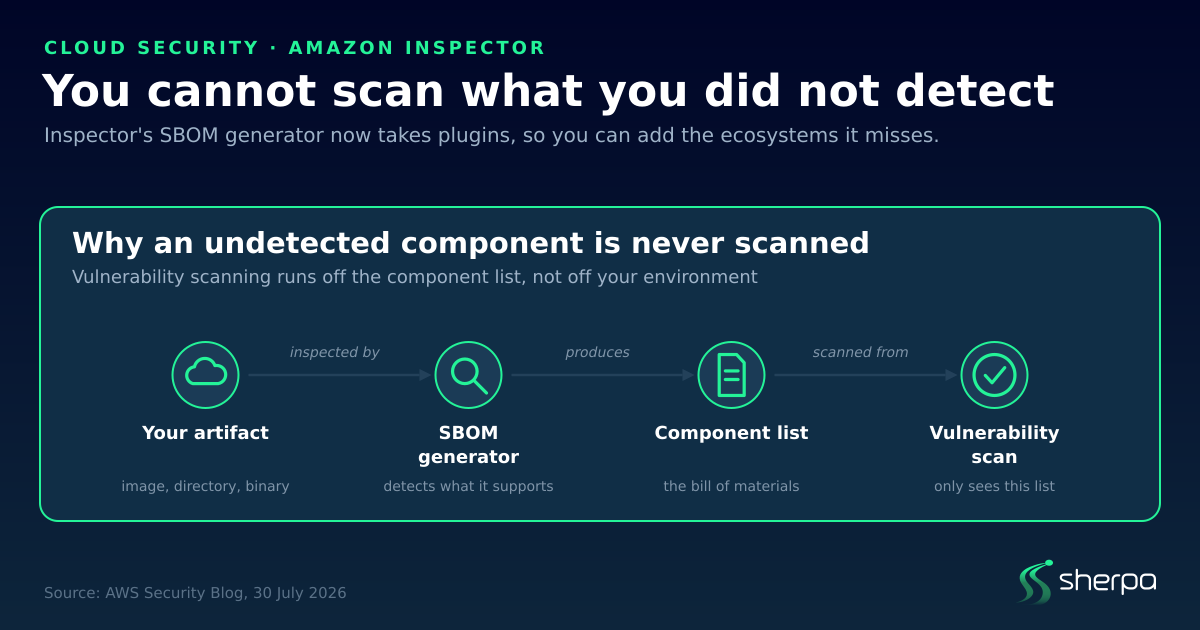
TL;DR. Vulnerability scanning does not read your filesystem. It reads a component list produced by an SBOM generator, and it can only find problems in components that made it onto that list. If the generator does not recognise an ecosystem, those packages are silently absent — the scan reports nothing, and nothing reports that anything was skipped. Amazon Inspector’s SBOM generator now accepts plugins written in Lua, so you can add detection for ecosystems it does not support out of the box. The broader point holds for any scanner you run: coverage is a property of the tool, not of your infrastructure.
Why a clean vulnerability report can be misleading
There is a difference between two statements that look identical on a dashboard:
- Nothing vulnerable is running.
- Nothing vulnerable was found in what the scanner knows how to look at.
Only the second one is ever actually measured. The gap between them is invisible by construction, because a component the generator never detected produces no finding, no warning, and no gap in the report. It simply is not there.
This is not a flaw in any particular scanner. It is how the pipeline works, and it is worth understanding before you treat a green report as evidence.
What inspector-sbomgen actually does
Amazon Inspector’s vulnerability management is powered by an asset inventory engine called inspector-sbomgen, a standalone command-line tool. It produces a software bill of materials — the itemised list of components inside an artifact — from container images, directories on disk, compressed archives, mounted volumes, compiled binaries and local systems.
The output is a CycloneDX SBOM in JSON. Each component carries the usual identifiers plus a property tracing it back to where it was found:
{
  "bom-ref": "comp-2",
  "type": "application",
  "name": "my-package-alpha",
  "version": "1.0.0",
  "purl": "pkg:generic/my-sbomgen-plugin/my-package-alpha@1.0.0",
  "properties": [
    {
      "name": "amazon:inspector:sbom_generator:source_path",
      "value": "./my-sbomgen-plugins/example.lock"
    }
  ]
}
That source_path property matters more than it looks. When you are auditing why something was or was not flagged, being able to trace a component back to the exact file it came from is the difference between a finding you can act on and a finding you have to re-investigate.
The gap plugins close
New programming ecosystems, package managers and lockfile formats appear continuously. A scanner’s built-in detection cannot keep pace with all of them.
Before plugins, that left two options: wait for an official release that adds support, or accept that some production software was invisible to scanning. Neither is a decision most teams made deliberately — it was just the state they were in.
Plugins remove the dependency on the release cycle. You can add detection yourself, without modifying source code or compiling anything.
How a plugin works
A plugin is a two-step pipeline, and the two steps are separate concerns.
Discovery identifies files that might contain package metadata. It is a small init.lua exposing a discover() function:
function discover()
    return sbomgen.find_files_by_name({"example.lock"})
end
Collection parses those files and registers what it finds. Another init.lua, exposing collect():
function collect(file_path)
    local content = sbomgen.read_file(file_path)
    -- parse content, then for each package found:
    -- sbomgen.push_package({ name = ..., version = ..., ... })
end
The two are wired together by an event bus using the observer pattern: discovery plugins publish file events, collection plugins subscribe to them. That separation is what lets one collection plugin serve several discovery rules, and vice versa.
push_package() requires name, version, purl_type, namespace and component_type. The API surface is deliberately small — find_files_by_name(), read_file(), push_package(), plus constants such as sbomgen.component_types.APPLICATION and the sbomgen.groups.* and sbomgen.platform.* enumerations.
You load plugins at runtime with --plugin-dir:
inspector-sbomgen directory --plugin-dir ./my-sbomgen-plugins --path ./targetThe same plugin works across artifact types. You write the detection logic once and it applies to container images, directories, archives, mounted volumes and local systems — the tool abstracts the differences away, so you are not writing one version for images and another for directories.
The sandbox, and why it matters
Running arbitrary third-party Lua inside your security scanner sounds like it should worry you. The design accounts for that: each plugin runs in an isolated Lua sandbox with the standard library cut down.
- No filesystem I/O. The
iolibrary is blocked. All file access is routed throughsbomgen.*, so a plugin reads what the host hands it and nothing else. - No subprocess execution. The
oslibrary is blocked. - No VM introspection. The
debuglibrary is removed. - No unbounded code loading.
require()is restricted to the plugin’s own directory.
There is also a failure-mode decision worth noting: a plugin error logs a warning but does not halt execution. A broken plugin degrades your coverage rather than breaking your scan. That is the right default for a scanning pipeline, but it has a consequence — a plugin that silently stopped working looks exactly like a plugin that found nothing. Warnings from your SBOM generation step are worth reading, not just its exit code.
Testing before you trust it
Plugins ship with a test framework, which matters given that a plugin’s failure mode is silence.
function test_discovers_packages()
    local result = testing.scan_directory("_testdata")
    testing.assert_equals(3, #result.findings)
end
Run them without a compile step:
inspector-sbomgen plugin test --path my-sbomgen-pluginsAnd scaffold a new plugin with a working example already in place:
inspector-sbomgen plugin new --with-exampleAssert on counts and specific packages against fixture data, not just that the plugin ran. A discovery rule with a typo in the filename finds zero files and reports success.
What shipped in version 1.13
The 1.13 release did two things at once. It moved more than 20 previously built-in ecosystems to the plugin system — Apache Tomcat, NGINX, MySQL, Redis, WordPress, OpenSSH among them — which is the stronger signal, because it means the plugin API is the same path AWS uses for first-party detection rather than a bolted-on extension point.
It also added more than 10 new ecosystems, including Apache Cassandra, Conda, Swift packages, and AI developer tooling such as Claude Code and Ollama.
That last category is worth pausing on. AI coding assistants are now software installed on developer machines and in build environments, with their own versions and their own supply chain. Treating them as inventory rather than as tooling is the correct instinct, and it is a reasonable prompt to ask what else is running in your environment that nothing currently inventories.
What to take from this
- Find out what your scanner does not support. Every scanner has an ecosystem list. If you have never read it, you do not know your actual coverage.
- Compare the SBOM to what you know you deploy. If a service uses a package manager you cannot find in the component list, that is your answer.
- Read the warnings from SBOM generation, not just the vulnerability report. A plugin that silently stopped detecting is indistinguishable from a clean result.
- Test detection against fixtures. Assert on specific packages and counts, because “the plugin ran” and “the plugin found what is there” are different claims.
- Treat coverage as a property of the tool. A clean report describes what the scanner can see. Whether that is the same as your environment is a separate question, and one you have to answer deliberately.
Frequently asked questions
What is inspector-sbomgen? It is the standalone command-line asset inventory engine behind Amazon Inspector’s vulnerability management. It generates a CycloneDX software bill of materials from container images, directories, archives, mounted volumes, compiled binaries and local systems.
What language are Amazon Inspector SBOM plugins written in? Lua. There is no compilation step, which is what makes prototyping detection for a new ecosystem quick.
How do I load a plugin?
Pass the directory at runtime, for example inspector-sbomgen directory --plugin-dir ./my-sbomgen-plugins --path ./target.
Is it safe to run a third-party plugin?
Plugins execute in an isolated Lua sandbox. Filesystem I/O (io), subprocess execution (os) and VM introspection (debug) are blocked, and require() is restricted to the plugin’s own directory. All file access goes through the sbomgen.* API.
What happens if a plugin fails? It logs a warning and execution continues. The scan does not break, but your coverage quietly narrows — which is why the warnings from SBOM generation are worth monitoring.
Why would a vulnerability scan miss a package entirely? Because scanning runs off the component list the SBOM generator produced. If the generator does not support that ecosystem, the package never enters the list, and there is no finding and no warning to indicate it was skipped.
Source: Extend Amazon Inspector SBOM Generator with Plugins, AWS Security Blog, 30 July 2026. Code samples are illustrative of the documented API; see the Lua plugin developer guide in the Amazon Inspector documentation for the current reference.
See what Sherpa finds in your AWS.
Sign upAfter you sign up, a member of the Sherpa team contacts you within one business day to discuss your AWS environment and the right way to start.