
Savings Plans coverage vs utilization: the two numbers that decide what you're actually saving
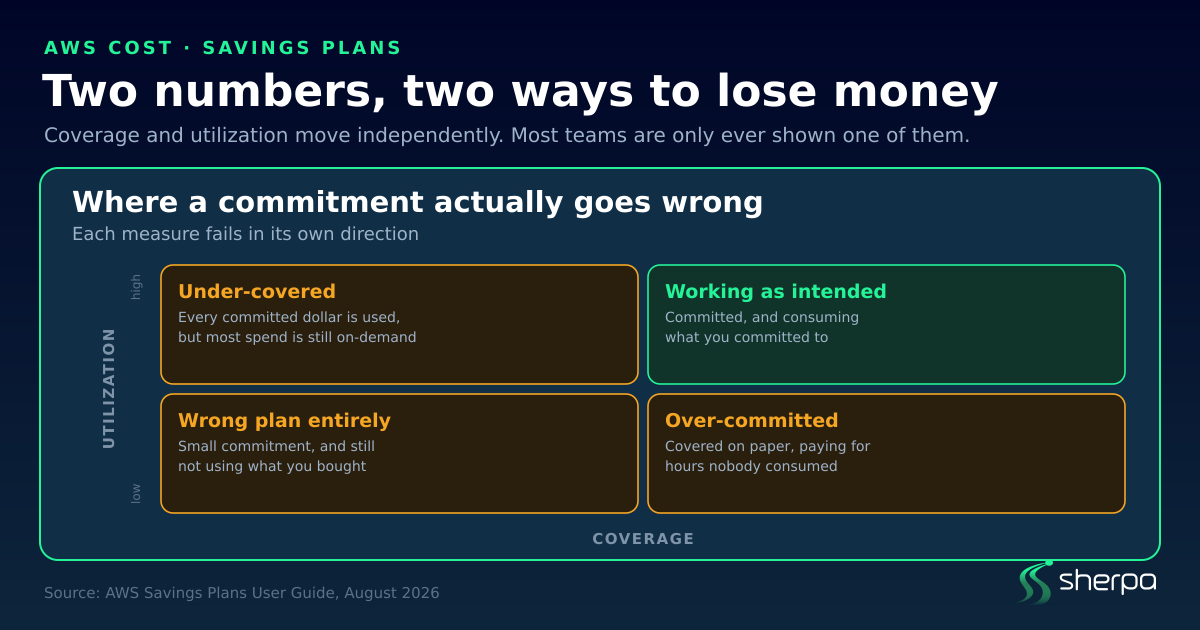
TL;DR. AWS Savings Plans trade flexibility for discount. An EC2 Instance Savings Plan pays the most, up to 72% off on-demand, because it locks you to one instance family in one Region. A Compute Savings Plan pays up to 66% and barely locks anything. Once you have bought one, two different numbers tell you whether it was a good decision: coverage, how much of your eligible on-demand spend the commitment absorbs, and utilization, how much of what you bought is actually being used. They fail in opposite directions, and looking at only one is how teams end up either overpaying on-demand or paying for commitment nobody is using.
What a Savings Plan actually is
A Savings Plan is not a discount on a resource. It is a commitment to spend a fixed amount per hour, for one or three years, in exchange for lower rates on the usage that commitment covers.
That distinction matters. You are not buying a cheaper instance. You are promising AWS a floor of hourly spend. If your usage drops below that floor, you still pay the floor.
Two things follow immediately:
- The term cannot be changed after purchase. AWS is explicit about this. You can buy additional plans as usage grows, but you cannot shrink, cancel or re-term the one you have.
- The commitment is denominated in dollars per hour, not in instances. This is why “we downsized the fleet” and “we reduced our Savings Plan spend” are unrelated sentences.
The four plan types, and what each one gives up
The headline rate is inversely related to flexibility. The more you let AWS pin down, the more they pay you.
| Plan type | Max discount | What it locks | What still flexes |
|---|---|---|---|
| EC2 Instance | up to 72% | one instance family, in one Region | size, operating system, tenancy |
| Compute | up to 66% | almost nothing | family, size, Region, OS, tenancy — plus Fargate and Lambda |
| SageMaker AI | up to 64% | SageMaker AI usage | family, size, Region, component |
| Database | up to 35% | database services | engine, family, size, AZ, Region, and serverless usage |
EC2 Instance Savings Plans are the highest-paying and the most brittle. You commit to something like m5 in us-east-1. Inside that boundary you have real freedom — move from m5.xlarge to m5.2xlarge, switch Windows to Linux, move from Dedicated to Default tenancy — and the rate holds. Step outside it, to a different family or Region, and that usage is billed at on-demand while you keep paying the commitment.
Compute Savings Plans apply regardless of instance family, size, Region, operating system or tenancy, and they also cover Fargate and Lambda. You can move a workload from c5 to m5, shift from Ireland to London, or migrate from EC2 to ECS on Fargate and keep the discounted rate.
Database Savings Plans cover Aurora, RDS, DynamoDB, ElastiCache, DocumentDB, Timestream, Neptune, Keyspaces, DMS and Amazon OpenSearch Service, applying to the latest provisioned instance generations regardless of engine, family, size, AZ or Region, and to serverless usage as well.
The right question is not “which pays most.” It is how confident are you that this workload stays where it is for the next one to three years. A 72% rate on a family you migrate away from in month seven is worse than a 66% rate you keep.
How you pay changes the rate, not the commitment
Each plan has three payment options: All Upfront, Partial Upfront, and No Upfront. Paying more upfront gets a better effective rate.
What it does not change is the obligation. No Upfront still commits you to the full hourly spend for the full term. The payment option is a financing decision; the commitment is the same either way.
Coverage and utilization are not the same number
This is where most of the confusion lives, and where the money leaks.
Coverage answers: of my eligible on-demand spend, how much is a commitment absorbing? Low coverage means you are paying on-demand rates for workloads that would have qualified for a discount.
Utilization answers: of the commitment I bought, how much am I actually using? Low utilization means you are paying for a floor your usage does not reach.
They move independently, and each one fails in its own direction:
- High coverage, low utilization. You committed generously. Most eligible spend is covered, but the commitment is larger than the usage sitting under it, so you are paying for hours nobody consumed. This looks healthy on a coverage dashboard.
- Full utilization, low coverage. Every dollar you committed is being used, so utilization reads 100%. But most of your eligible spend is still on-demand, and you are leaving the discount on the table. This looks healthy on a utilization dashboard.
One number tells you what you are missing. The other tells you what you are wasting. A report showing only one of them cannot tell you whether your commitment strategy is working.
If you are diagnosing unused commitment, the useful breakdown is per-plan: total commitment, used commitment, the unused remainder, and the expiration date. Aggregate percentages hide the plan that is quietly burning money, especially in an organisation with many linked accounts where a single healthy account can mask several unhealthy ones.
What Savings Plans never cover
Two exclusions are worth checking before you size a commitment, because both are easy to assume away:
- Amazon EKS charges are not covered. The EC2 instances underneath your cluster are covered by both Compute and EC2 Instance plans, but the EKS charge itself is not.
- The Dedicated Instance fee is not discounted. Dedicated Instances carry a $2 per hour charge in every Region where you run at least one, and Savings Plans do not reduce it.
Both Compute and EC2 Instance plans do apply to the EC2 instances inside Amazon EMR, Amazon EKS and Amazon ECS clusters — it is only the EKS service charge itself that sits outside.
A practical way to decide
- Establish your floor before you commit. Look at the hourly on-demand spend you have never dropped below, not your average. The commitment is a floor, so size it against your trough.
- Match the plan to the volatility of the workload. Stable, long-lived, single-family fleets can justify EC2 Instance plans. Anything you expect to migrate, re-platform or re-Region belongs on a Compute plan.
- Read both numbers, always. Coverage without utilization, or utilization without coverage, is half a picture.
- Check the exclusions against your architecture. If a meaningful share of your bill is EKS charges or Dedicated Instance fees, your realistic coverage ceiling is lower than you think.
- Ladder rather than committing all at once. Because terms cannot be changed after purchase, several smaller plans bought over time leave you more room than one large one bought at a peak.
Frequently asked questions
Can I cancel or change a Savings Plan? No. AWS states that the terms of the commitment cannot be changed after purchase. You can buy additional plans as your usage grows, but you cannot cancel, resize or re-term an existing one.
What is the difference between Savings Plans coverage and utilization? Coverage measures how much of your eligible on-demand spend is being absorbed by a commitment. Utilization measures how much of the commitment you purchased is actually being consumed. Low coverage means you are missing discounts; low utilization means you are paying for unused commitment.
Which Savings Plan gives the biggest discount? EC2 Instance Savings Plans, at up to 72% off on-demand. They are also the most restrictive, requiring a commitment to a specific instance family in a specific Region.
Do Savings Plans cover Fargate and Lambda? Compute Savings Plans do. EC2 Instance Savings Plans do not — they apply only to EC2 usage within the committed family and Region.
Do Savings Plans cover EKS? The EC2 instances underneath an EKS cluster are covered. The Amazon EKS charge itself is not.
Is No Upfront a smaller commitment than All Upfront? No. The payment option changes your effective rate, not the obligation. All three options commit you to the same hourly spend for the full term.
Sources: AWS Savings Plans and the Savings Plans User Guide, retrieved August 2026. Discount percentages are AWS’s published maximums and vary by instance type, Region and term.
See what Sherpa finds in your AWS.